


Inspired Minds: Activity Ideas
3.817.00 Reviews
App Specs
- Version
- 5.9.0
- Updated On
- License
- Free
- Downloads
- 50,000+
- Developer
- I Teach Tiny Humans, LLC
- Categories
- Parenting
- Platform
- Android
Screenshots
 Analysis by AppCompare
When a child says “I’m bored,” the hardest part can be coming up with an idea that suits their mood, your available time, and whatever is already in the house. I find Inspired Minds: Activity Ideas most useful as a starting point for that moment: it is a parenting app from I Teach Tiny Humans, LLC, focused on helping adults find ways to encourage children’s creativity. It is free to install, rated for Everyone, and has a 4.0 average from around 74 ratings. In-app purchases range from $6.99 to $39.99 per item, so I’d check what is included before deciding whether to spend anything.
A practical starting point, not a substitute for planning
The app’s appeal is easy to understand: instead of asking a search engine a broad question and sorting through pages of results, I can use an activity resource to get oriented and choose something to try. That distinction matters when I’m supervising a child and don’t have time to read several unrelated articles. Still, a suggested activity is only a beginning. I would look over its directions and materials before presenting it, especially if the child is very young or the activity involves tools, small objects, or messy supplies.
A realistic use is a rainy afternoon when a planned outing falls through. I’d first decide whether I want a quiet project or something more active, then choose an idea that fits the time I have and the materials I can gather without another trip to the shop. Before inviting a child to join, I’d set out the supplies and make sure I understand the steps. That small bit of preparation can prevent an activity from turning into a frustrating hunt for missing items.
Who is likely to get the most from it
I can see this being especially helpful for parents who want fresh prompts but prefer to do the activity alongside their children rather than hand over a screen. It also makes sense for educators who need ideas to consider while planning, though I would adapt any suggestion to the children, space, schedule, and classroom resources in front of me. The useful role here is idea discovery: the adult still decides what is appropriate and how to guide it.
It may be less suitable if you need a tightly structured curriculum, formal lesson plans, or a guaranteed sequence of activities tied to specific learning goals. In those cases, a dedicated teaching resource is likely a better fit. It is also not the best choice when a child needs immediate entertainment and the adult cannot supervise or prepare anything; an activity app can offer inspiration, but it cannot make setup disappear.
Choosing ideas that work in real life
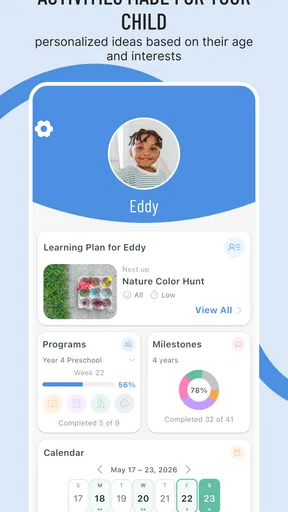
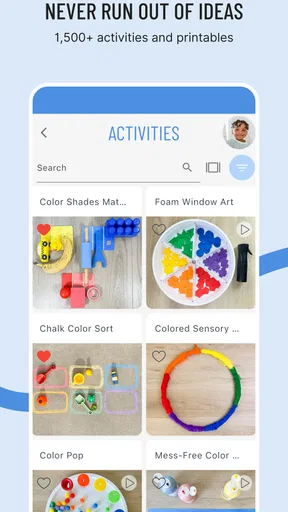
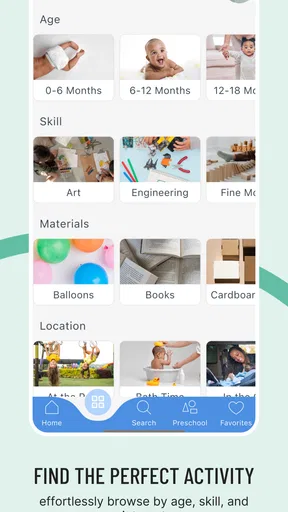
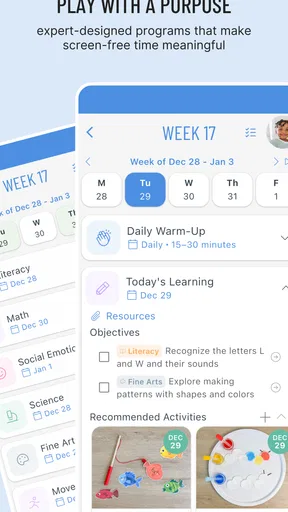
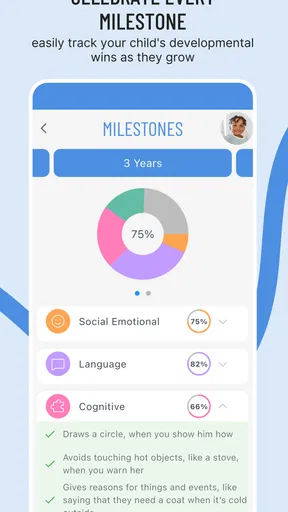
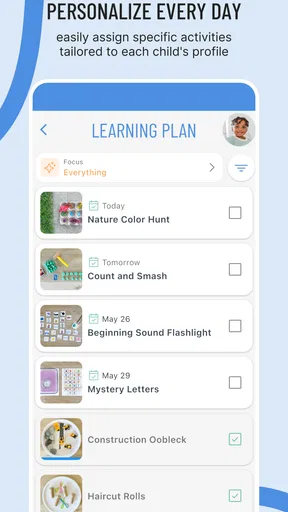
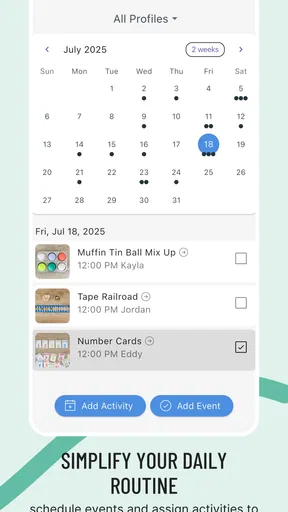
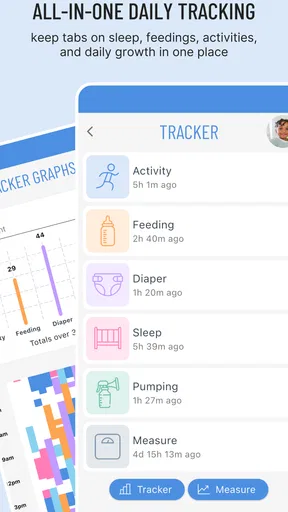
When I first opened Inspired Minds: Activity Ideas, I was greeted by a vibrant and user-friendly interface. The app categorizes activities based on age groups, interests, and even the type of skills you want to develop. From arts and crafts to science experiments, the app seems to have it all. It’s like having a personal assistant dedicated to keeping the young minds around you active and entertained.
Easy Navigation and Search Features
One thing I really appreciated was how easy it was to navigate through the app. The search feature is intuitive and helps you find exactly what you're looking for. You can filter activities by time, materials needed, or difficulty level. So, if you're in a pinch and need a quick activity with items you already have at home, this app has got you covered.
Worth Reading Before You Choose

Flipboard Shows What News Apps Must Do Beyond the Feed

Switching to Android Auto Means Rethinking Your Driving Routine

Google Calendar Makes a Crowded Week Easier to Manage

Ludo King Makes the Most of the Minutes Between Plans

Baby Panda World Brings Quick Play to Modern Phones, but Its Game Library Feels Busy

ESPN’s Live Game View Makes Following Close Games Easier
Use filters as a decision shortcut
The practical value of filters is not only finding an idea quickly; it is narrowing the choice before a child gets invested in something you cannot carry out. I’d start with the time available and materials on hand, then consider difficulty. If a child is already restless, I would avoid showing a long list and instead choose a couple of realistic options myself. That keeps the app in the adult’s planning role and leaves the child with a simple, satisfying choice.
Compared with general web searches, a dedicated activity collection can make browsing feel more focused. Search results elsewhere may mix age ranges, skill levels, and supply lists, leaving the parent to do the sorting. The trade-off is that no filter can know the specifics of your home or group. I would still check whether an activity suits the child’s interests, whether the materials are safe and available, and whether the expected cleanup is realistic.
In-Depth Activity Descriptions
Each activity comes with a detailed description, including step-by-step instructions and a list of required materials. There's even a section on what skills the activity will help develop. This is perfect for anyone who wants to make sure the activities are not just fun but also educational. Plus, the app provides alternatives and suggestions to tweak activities based on your child's preferences or materials you have at hand.
Make the instructions fit the child
I would treat the skill information as a helpful prompt, not a promise that every child will learn the same thing from an activity. A child may be more interested in experimenting than following each step, and that can be part of the fun. For a group, I’d read the directions ahead of time and decide which parts are essential and which can be simplified. For one child, I might let them choose colors, materials, or a small variation so the idea feels personal without becoming a different project altogether.
The alternatives are particularly useful when a household is short on supplies. Rather than abandoning an idea because one item is missing, I’d check whether the suggested substitute is suitable and whether it changes the activity’s difficulty or cleanup. This is a small but meaningful planning habit: improvisation works best when the adult checks the replacement first, rather than discovering halfway through that it does not behave as expected.
Engaging and Creative Ideas
What sets this app apart is its creativity. I found myself bookmarking so many activities and even trying a few myself! The ideas are fresh and innovative, ensuring that kids are not only entertained but also challenged. Whether you want to inspire their artistic side with a painting session or teach them some basic coding skills, the app has something for every interest and passion.
Save ideas for the right moment
Bookmarks make more sense to me as a small planning shelf than as a collection to build endlessly. I’d save a few options that suit common situations: a short activity for a weekday, a project for a slower afternoon, and something that can work with supplies already at home. Before using one, I’d reopen it and check the instructions and materials again. A saved idea is convenient, but it does not guarantee that the child’s mood or the household setup will match the original plan.
There is also a useful balance between offering children a challenge and keeping the activity achievable. If a suggestion seems ambitious, I’d scale it down by preparing the more fiddly parts myself and letting the child handle the choices and creative work. That approach can preserve the satisfying part of a project without expecting a young child to manage every step independently.
Speed expectations and busy moments
For a parent, “fast” means getting from a need to a usable idea without turning planning into another task. Search and filters are intended to support that process, but the quickest route still depends on knowing what you need: a short activity, familiar materials, or a particular kind of challenge. When the household is already hectic, I would browse before bringing the child into the decision, then offer one or two options rather than scrolling together for too long.
Heavier use is likely to happen when you are planning several days of activities or looking for different ideas for siblings or a class. In that situation, I would keep the selection manageable and note which supplies overlap, so one shopping or preparation session can support more than one project. That is a practical way to make an idea library useful beyond a single rainy afternoon, without assuming that every suggestion will fit every child.
Regular Updates and New Additions
One of the coolest features of Inspired Minds: Activity Ideas is its regular updates. The developers seem committed to keeping the app fresh with new activities added frequently. This means you’ll never run out of ideas, and there’s always something new to explore. It's like having a never-ending supply of creativity at your fingertips.
Reliability and what to check
For a resource I might use repeatedly, consistency matters as much as novelty. The app is on version 5.1.0, and its 10K+ installs suggest that it has found an audience among families and caregivers. I would still judge reliability by my own routine: can I find an idea when I need one, and are the instructions clear enough to prepare without guesswork? I’d avoid relying on any activity at the last minute until I had checked its directions and gathered the materials.
Updates can help keep an idea collection lively, but they do not remove the need to review an activity before using it. If I am planning for a group, I would have a backup option ready in case the chosen project proves too involved or the children lose interest. That is not a criticism unique to this app; it is simply sensible preparation for any activity resource.
Community and Sharing Features
Another aspect I loved is the community aspect of the app. You can share your own activity ideas and see what others are doing. There's a real sense of collaboration, and it's inspiring to see what other parents and educators are up to. You can even leave reviews and tips on activities you've tried, which adds a layer of interaction and support among users.
How sharing fits into planning
Shared ideas can be useful when I want to see how another adult approached an activity, but I would treat community tips as suggestions rather than instructions that automatically suit my household. A note about a substitution or a child’s reaction may help me anticipate a snag; I would still check materials and adapt the plan myself. If I have a variation that worked well, contributing it could make the activity more useful to the next person, especially when the change is specific and easy to follow.
This social element also changes the comparison with a simple printed activity book. A book can be dependable and easy to keep nearby, while a community-based resource can offer a sense of exchange and evolving ideas. The trade-off is that shared content may require more judgement from the reader. I would choose a book when I need a fixed, dependable plan and use the app when I want to browse, adapt, or gather inspiration.
Device constraints and everyday use
The minimum operating system is 7.0, which gives the app a broad device baseline, but an older compatible device may still feel different from a newer one. I would keep expectations modest about performance because speed depends on the phone or tablet as well as the app. Since this is a resource for adults to consult while organizing children’s activities, I would also think about whether my device is comfortable to use in that setting and whether I can put it aside once the project begins.
For a low-friction routine, I’d browse and prepare before inviting children to start, then keep the device out of the center of the activity. That avoids turning a hands-on idea into a long screen session and helps the adult stay present. If the app feels slow on a particular device, choosing and saving an idea ahead of time is a better workaround than trying to search while everyone is waiting.
Perfect for Educators and Parents Alike
Whether you're a teacher looking for classroom activities or a parent trying to keep your kids engaged at home, this app is a fantastic resource. It’s designed to be flexible and adaptable to different settings, making it a valuable tool for anyone involved in a child's development and education.
Cost, expectations, and the right fit
The app is free to install, but the listed in-app purchases run from $6.99 to $39.99 per item. I would explore the free experience first and decide whether the ideas available there meet my needs before buying anything. That makes the cost easier to judge against how often I actually use the resource. Someone who wants only occasional inspiration may not need to spend; a parent or educator who regularly plans activities may find a paid option worth considering if it fits their routine.
At a 4.0 average across around 74 ratings, it has a generally positive reception, though that alone cannot tell me whether its approach suits my family. Its Everyone age rating is about the app’s content classification, not a recommendation to leave children to use it independently. I see it primarily as an adult-facing planning aid: the parent or educator chooses the idea, prepares it, and guides the child through it.
All in all, Inspired Minds: Activity Ideas is more than just an app; it's a gateway to discovery and creativity. It’s a must-have for anyone who wants to inspire and engage young minds. So, if you're ready to turn off the TV and embark on some exciting new adventures, give this app a try. You won’t be disappointed!
My performance verdict
For me, the strongest case for this app is not that it eliminates planning, but that it can make the first step easier: finding a workable idea and shaping it around the child, time, and materials at hand. I would recommend it to adults who enjoy hands-on activities and are willing to prepare and adapt. I would skip it if I needed a structured curriculum, an entirely hands-off solution, or a guarantee that every activity would be ready to run without checking.
Used thoughtfully, it can be a handy prompt when familiar ideas have run dry. I’d keep a short list of suitable activities, check the directions before each session, and have a simpler alternative ready for unpredictable days. That is the approach that makes the app most useful to me: a source of possibilities, with the adult’s judgement still doing the important work.
Pros
- Wide variety of creative activities.
- User-friendly interface for easy navigation.
- Regular updates with new ideas.
- Suitable for all age groups.
- Offline access to saved activities.
Cons
- Limited customization options.
- Some activities require in-app purchases.
- Occasional bugs in activity loading.
- No option for user-generated content.
- Limited social sharing features.
FAQs for Inspired Minds: Activity Ideas
What is Inspired Minds: Activity Ideas about?
Inspired Minds: Activity Ideas is an app designed to provide users with a wide variety of activity suggestions to enhance creativity and productivity. Whether you're looking for solo activities, group projects, or mindfulness exercises, this app offers tailored recommendations based on your preferences and interests.
How user-friendly is the app interface?
The app features a clean and intuitive interface that is easy to navigate for users of all ages. With clearly labeled categories and a search function, finding activities is straightforward. The app’s design ensures that users can quickly access and explore hundreds of ideas without any hassle.
Can I customize the activity suggestions?
Yes, Inspired Minds allows for personalization. Users can set their interests and preferences to receive tailored activity suggestions. Whether you're interested in art, fitness, or relaxation, the app adjusts its recommendations accordingly, ensuring a personalized experience every time you use it.
Is Inspired Minds suitable for all age groups?
The app is designed to cater to a wide audience, offering activity ideas suitable for various age groups. From educational tasks for children to relaxation techniques for adults, it ensures that everyone can find something beneficial, making it a versatile tool for families and individuals alike.
Does Inspired Minds require an internet connection?
While the app is fully functional offline, certain features like downloading new activity packs and syncing across devices do require an internet connection. However, once activities are downloaded, they can be accessed anytime, allowing for flexibility in usage without needing constant connectivity.


